
[DevLab] 7. When to Use AI
You've probably used (or at least heard about) GitHub Copilot, Cursor, or ChatGPT for coding. These tools are becoming standard in the industry - many companies expect you to use them at your internship. They can help experienced developers ship code faster, catch bugs, and handle tedious boilerplate.
But here's what you need to understand about CSC Dev Lab: we're generally opposed to using AI tools to write your code.
This isn't because we think AI is bad. It's because Dev Lab exists to teach you fundamentals. The whole point of this program is to build the foundation you'll need when you get to an internship or job. Once you truly understand those fundamentals, AI can make you exponentially stronger. But if you skip the learning phase, you'll never develop the skills that make you valuable as an engineer.
The Dev Lab Philosophy on AI
Here's our stance, clearly:
In Dev Lab, we'd rather you:
- Struggle with a problem for a bit
- Bang your head against the wall
- Ask your teammates for help
- Work through it with your project mentor
- Read documentation
- Debug line by line until you understand what's wrong
Than:
- Blindly paste AI-generated code you don't understand
This isn't about making things harder for you. It's about making you better. When you struggle with a problem and eventually solve it, you learn. When you paste AI-generated code, you ship features, but you don't grow as an engineer.
Why This Matters: The Learning vs. Shipping Trade-off
Yes, there's solid evidence that AI coding tools speed up development. GitHub's research found that developers completing tasks with Copilot were up to 55% faster⁽¹⁾, and McKinsey estimates 30-60% time savings on boilerplate and documentation⁽²⁾.
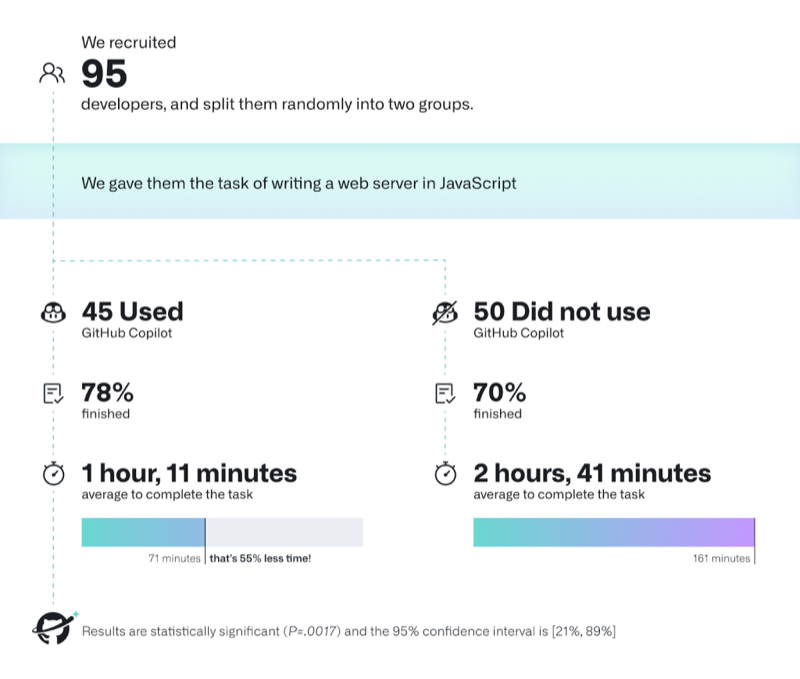
But those studies measure experienced developers who already understand what they're building. They know how to evaluate the AI's output. They can spot bugs, security issues, and architectural problems. They've already built the mental models that Dev Lab is designed to teach you.
You're not there yet - and that's completely fine. That's literally why Dev Lab exists.
If you use AI to write code you don't understand, here's what you're missing:
- Understanding how systems work: You won't learn how data flows through your application
- Debugging skills: You can't fix what you don't understand
- Design intuition: You won't develop the instinct for good vs. bad approaches
- Code review ability: You can't evaluate others' code if you've never written it yourself
- Interview preparedness: You'll struggle with technical interviews that require understanding fundamentals
The uncomfortable truth: If you're using AI as a crutch in Dev Lab, you're robbing yourself of the learning experience that will make you employable.
After Dev Lab: When AI Becomes Your Superpower
Once you've built the foundation in Dev Lab—once you understand how web applications work, how to structure code, how to debug, how to review PRs—then AI becomes incredibly powerful.
At your internship or first job, with fundamentals solidly in place, you'll be able to:
- Use AI to handle boilerplate while you focus on architecture
- Quickly prototype ideas because you know what good output looks like
- Debug AI-generated code because you understand what's happening under the hood
- Evaluate trade-offs because you've made those decisions manually before
The key difference: You'll be using AI from a position of knowledge, not ignorance.
Vibe Coding: What We're Trying to Avoid
"Vibe coding" is what happens when you let AI do your thinking for you:
- Type a vague prompt into Cursor or Copilot
- Copy-paste the entire output
- Run it
- If it compiles and seems to work, commit it
- Move on without actually understanding what it does
This creates several problems:
1. Security Vulnerabilities
AI tools often suggest outdated packages or insecure patterns. If you don't know enough to review the code critically, you won't catch these issues until they become serious security problems.
2. Unmaintainable Code
LLMs don't know about your codebase's existing patterns, utilities, or design decisions. They generate code in isolation. The result is duplicate logic, inconsistent patterns, and code that's increasingly hard for your team to maintain.
3. Skill Atrophy
If you're always delegating implementation to AI, you're not building the skills you need. You can't debug what you don't understand. You can't design systems if you've never wrestled with the details. You can't pass technical interviews if you've never actually implemented these patterns yourself.
In Dev Lab, this is unacceptable. We'd rather you submit less code that you fully understand than ship more code that you can't explain.
If You Must Use AI in Dev Lab: The Rules
We strongly discourage using AI tools to write your Dev Lab code. But if you do use them, here are the absolute non-negotiable rules:
Rule 1: The Explanation Test
You must be able to explain every single line of AI-generated code to your project mentor in a code review.
If you can't explain:
- What the code does
- Why it does it that way
- What would break if requirements changed
- Why this approach was chosen over alternatives
Then you don't understand it well enough to commit it. Delete it and write it yourself.
Rule 2: Never Vibe Code
The workflow for any AI-assisted work must be:
- You decide what needs to be built and how data should flow
- You design the API, choose the architecture, and plan the implementation
- You write detailed prompts with full context about your codebase
- You review every single line the AI generates
- You refactor it to match your team's patterns
- You verify it works and understand why
- You could reproduce it from scratch if you had to
If you're just hitting "Accept" and moving on, you're not ready for that code to be in your project.
Rule 3: Use AI for Learning, Not Implementation
The only truly acceptable use of AI in Dev Lab is as a learning tool:
Good uses:
- "Explain how React's useEffect hook works and show me an example"
- "I'm getting this TypeScript error: [paste error]. What does it mean and how do I fix it?"
- "What's the difference between
map()andforEach()in JavaScript?" - "Walk me through how this code works line by line"
After the AI explains it: Go write the code yourself. Use the AI to understand concepts, not to skip implementation.
Bad uses:
- "Write a user authentication system for my app"
- "Create a dashboard component with these features"
- "Implement this API endpoint"
These rob you of the learning opportunity. Write these yourself, struggle through them, ask your teammates for help when you're stuck.
What We Really Want You to Do Instead
Instead of reaching for AI when you're stuck, try this:
1. Struggle for at least 30 minutes
Set a timer. Try to solve the problem yourself. Read error messages carefully. Add print statements. Walk through the code line by line. This is where learning happens.
2. Check existing code
Look at how similar problems are solved in your codebase. Your teammates probably already implemented something similar. Learn from their approach.
3. Read the documentation
Official docs for React, Next.js, TypeScript, etc. are incredibly well-written. They include examples and explanations. This builds real understanding.
4. Ask your teammates
Use your Dev Lab Discord. "I'm trying to do X, I've tried Y and Z, but I'm getting this error. Anyone have suggestions?" This builds team collaboration skills.
5. Work with your project mentor
This is literally what they're there for. Schedule time to pair program through tough problems. You'll learn way more from this than from AI.
6. Search Stack Overflow and GitHub Issues
Other people have hit this problem before. Reading how they solved it (and understanding why their solution works) builds your debugging skills.
The Bottom Line
In CSC Dev Lab, your goal is not to ship features as fast as possible. Your goal is to become a competent engineer.
Every time you use AI to write code you don't understand, you're choosing short-term convenience over long-term growth. You're making future you weaker.
When you get to your internship, when you land your first job, when you're working on production systems - then you can leverage AI to move faster. Because by that point, you'll have the foundation to use it responsibly. You'll know what good code looks like. You'll be able to spot bugs and security issues. You'll understand the trade-offs.
But right now, in Dev Lab, your job is to build that foundation.
Final reminder: We'd rather see you struggle, learn, and grow than ship code you don't understand. The struggle is the point. That's where the learning happens.
If you're not sure whether using AI for a specific task is appropriate, ask your project mentor. When in doubt, write it yourself.
Next Steps
- Check out DevLab 3: Writing Clean Code: learn what good code looks like so you can evaluate AI output later
- Read DevLab 4: Agile & Project Management: understand how to break down problems so you can solve them yourself
- Review DevLab 5: Code Review Best Practices: practice explaining code in reviews to build the skills you need
Attribution & Acknowledgements: We stand on the shoulders of giants. Thanks to the open source communities and insights from Claire Longo, Philip Mutua, and Aalap Davjekar that helped shape these practices.
References:
⁽¹⁾ GitHub Research: Quantifying Copilot's impact
Share this guide
Help others discover this resource